
Let’s be honest about how most companies actually talk to each other internally. It’s email chains. A shared drive nobody’s cleaned since 2019. Some Slack channels a manager set up once and everyone forgot existed. An Intranet Web Portal fixes a good chunk of that mess. Not all of it, but a good chunk, by giving employees one place to find policies, updates, tools, and each other, instead of five separate ones.
So here’s what a proper intranet setup actually involves, how it stacks up against SharePoint and Teams, and where SoftFix Technologies fits in if you’re a Canadian business trying to get this right the first time around.
What Is an Intranet Web Portal?
Simple version. An intranet web portal is a private website built for one organisation’s own people, not the public. Company news, documents, HR forms, internal tools – it all sits behind one login. Nobody’s digging through five different apps just to find a single policy PDF anymore, or at least that’s the idea.
How Does an Intranet Portal Work?
Most of these run on a central server or cloud setup, and what you see depends on your role. Log in once, usually with single sign-on, and you land on a dashboard built around your department, your team, or whatever’s actually relevant that day. That’s really the whole mechanism.
What’s the Difference Between an Intranet and the Internet?
One’s public. The internet’s open to anyone with a connection. An intranet isn’t; it’s closed off to people inside one organisation, shaped entirely around that company’s own structure, branding, and workflows, not general public content at all.
Why Canadian Businesses Need Intranet Software
Corporate intranet solutions matter a lot more now than five years back, and hybrid work is basically the reason. Teams got spread across cities and time zones almost overnight, and intranet software gives that scattered workforce a shared home base instead of trying to hold everything together through email threads and good intentions.
What Are the Benefits of an Intranet Portal for Businesses?
A handful of ways this tends to pay off in practice, not just on some sales page somewhere.
- Faster access to policies, forms, and internal documents
- Fewer repetitive questions landing in HR’s inbox
- One source of truth instead of five outdated versions of the same file floating around
- Stronger employee engagement, visible recognition, company news, that sort of thing
- Easier onboarding, since new hires get one starting point instead of a scavenger hunt
Core Features of Good Intranet Portal Software
Nobody needs every feature that exists. A handful of them, though; those tend to be what separates an actually useful platform from a glorified file folder wearing a logo.
What Features Should a Good Intranet Portal Have?

Employee Intranet Portal vs Digital Workplace Platform
People throw these two terms around like they’re the same thing. They’re not, not quite, and it’s worth sorting out the difference before picking anything.
What Is a Digital Workplace Intranet?
A digital workplace platform is the bigger version, basically. Start with a basic employee intranet portal. Bolt on collaboration tools, workflow automation, and maybe even an enterprise social network layer on top of that, and suddenly you’re not looking at a document library with a news feed glued on. You’ve got one connected environment instead.
Internal Communication Portal and Employee Portal Software
An internal communication portal, at its core, handles announcements, leadership updates, and company-wide messages. Nothing more complicated than that, really. Employee portal software tends to go a step further; HR gets folded in too, so staff checks paylips, benefits, and time-off requests, all from one page, no tab-switching required.
SharePoint Intranet vs Custom Intranet Solutions
Here’s the fork in the road most businesses hit early. This decision shapes cost, flexibility, and timeline more than most people expect walking in, honestly.
Is SharePoint Considered an Intranet?
Sure, it can be. A lot of companies already own a Microsoft 365 license with SharePoint sitting right there, unused, so why not put it to work? One catch, though. Fresh out of the box it behaves more like a document library than an actual website anyone wants to open, so real customization ends up being necessary if you want it to feel intuitive.
Intranet vs SharePoint vs Microsoft Teams
Teams handles chat and meetings. SharePoint handles document storage and page building. A dedicated intranet platform, meanwhile, usually pulls both of those into a single branded front door, so nobody’s bouncing between three apps just to survive an ordinary Tuesday at work.
Cloud-Based Intranet vs On-Premise Intranet
Cost, upkeep, how easily remote folks can log in – all of it hinges on this one choice.
Go cloud-based, and the intranet lives externally, opens right in a browser, and the vendor handles updates and infrastructure quietly behind the curtain. Go on-premises instead, and it sits on your own company servers. More control, yes. Also a lot more internal IT effort just to keep the thing running without constant hiccups.
Open-Source Intranet vs Paid Intranet
Open-source is cheaper to start, on paper anyway. Reality’s a bit different, since it eats up development hours to customise and lock down properly, and those hours cost something too, whatever the zero-dollar sticker implies. Paid intranet software flips that trade: you give up the upfront savings in exchange for ongoing support, a faster setup, and features that already work rather than needing to be built in-house from nothing.
Employee Engagement, Document Management, and Knowledge Sharing
These three get sold as separate products a lot of the time. In practice, they lean on each other constantly, whether vendors admit it or not.
Employee engagement software built into an intranet might cover recognition boards, pulse surveys, and company announcements, generally keeping people plugged into what’s happening outside their own little team bubble. Underneath sits a document management system, keeping files organised and versioned so nobody’s still emailing around a file called final_v3_ACTUAL.docx well into 2026.
Workplace Collaboration Tools and Enterprise Social Network
Workplace collaboration tools built into a portal let teams comment, share updates, and work through shared spaces without jumping to a separate app every single time. Some platforms bolt on an enterprise social network layer too, basically an internal company feed, giving visibility across departments that wouldn’t otherwise cross paths much at all.
HR Portal Software and Employee Self-Service Portal
HR portal software handles the paperwork and end-of-things, onboarding documents, policy acknowledgements, and benefits enrolment. An employee self-service portal takes it further, letting staff update their own details, request time off, and check pay history, all without emailing HR every time something small comes up.
Read More: Agentic AI Development Company: The Complete 2026 Guide for Canadian Businesses
None of this counts for much if the platform isn’t secure. Security and governance deserve real attention up front, not as something bolted on after a problem’s already happened.
Intranet security best practices generally cover role-based permissions, encrypted storage, and regular access audits. Single sign-on (SSO) intranet setups cut down on password fatigue and on the security risks that come from staff reusing one weak password across a dozen different internal tools.
An intranet governance framework matters more than people expect too. Somebody needs to actually own content quality, decide what gets published, and stop outdated pages piling up year after year, quietly, until nobody trusts the platform anymore.
Remote Work Portal and Hybrid Work Support
A remote work portal isn’t really optional anymore for most Canadian businesses, not with how normal distributed teams have become. Hybrid work portal features, flexible scheduling, virtual meeting integration, and asynchronous updates help keep in-office and remote staff on roughly equal footing rather than remote folks feeling like an afterthought bolted onto the org chart.
Digital employee experience (DEX) has become its own thing lately too, basically measuring how smooth or painful it feels for someone to actually get through their workday using company systems, intranet very much included.
How Do You Build an Intranet for a Small Business?
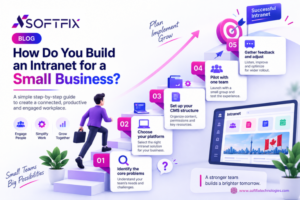
Smaller businesses don’t need a full enterprise rollout to get real value out of an intranet. The planning steps still matter, though, even scaled way down.
- Identify the core problems: scattered files, poor communication, slow onboarding
- Choose between SharePoint, a dedicated intranet platform, or a custom build
- Set up a basic intranet CMS structure with departments and document folders
- Pilot with one team before rolling out company-wide
- Gather feedback and adjust before the full launch
Intranet Rollout/Implementation Plan
A phased rollout usually beats one single company-wide launch. Piloting with a single department first surfaces the usability problems while the stakes are still low enough to fix things quietly, without an audience watching.
Change Management for Intranet Launch
Even a well-built portal falls flat if nobody actually opens it. Change management for an intranet launch usually means clear communication about why the switch is happening, some training sessions, and one designated person fielding questions during those first rough few weeks.
Intranet Adoption Strategies and Content Strategy
Adoption doesn’t just happen because a shiny new tool exists, unfortunately. Intranet adoption strategies that actually work tend to involve visible leadership buy-in, early wins that solve a real pain point fast, and a few champions scattered across departments who can answer questions informally instead of routing everything straight to IT.
An intranet content strategy matters just as much as the technical build, arguably more. Stale, outdated pages kill trust in the platform fast, so someone needs to actually own keeping content current. Intranet naming best practices play a small but real role too; a memorable internal name gets referenced casually in everyday conversation far more than a flat label like “the portal” ever will.
Measuring Success: Intranet Analytics, Metrics, and ROI
Intranet analytics and metrics show whether the investment’s actually paying off or just sitting there gathering dust. Login frequency, page views, and search usage – all of it gives a rough sense of whether people are using the platform or just tolerating it because they have no choice.
Building an intranet ROI business case usually means tying those metrics back to time saved, reduced HR ticket volume, faster onboarding timelines. Leadership tends to respond a lot better to actual numbers than to vague claims about “improved communication” floating around in a slide deck.
How Much Does Intranet Software Cost in Canada?
Pricing swings quite a bit depending on company size and whether you’re going off-the-shelf, a customised SharePoint build, or something fully custom from the ground up. Smaller businesses can expect costs somewhere between a few hundred and a few thousand dollars monthly for a hosted platform, while larger custom builds carry upfront development costs that scale with complexity and however many integrations you actually need.
For deeper context on intranet usability standards that also affect long-term cost through reduced support needs, the Nielsen Norman Group’s intranet design research is a solid, vendor-neutral reference point worth a look.
What Is the Best Intranet Software in Canada?
No single universal answer here, since the best intranet platform for business really depends on company size, existing tech stack, and whether Microsoft 365’s already in the mix. A few things do consistently separate the strong providers from the weak ones, though: Canadian data residency options, responsive local support, and actual customization instead of a rigid template stretched awkwardly to fit.
Best Intranet Providers in Canada
Businesses weighing an intranet web portal Canada option should compare vendors on support responsiveness, integration options, and whether pricing scales sensibly as the company grows, not just on how polished the initial demo looked.
Intranet Software Company Toronto: Why Location Matters
Working with an intranet software company based in Toronto, or really anywhere else in Canada, often means faster support response times and a better grasp of Canadian data privacy requirements, compared to relying entirely on some overseas vendor.
SoftFix Technologies: Intranet Web Portal Solutions Across Canada
SoftFix Technologies works with Canadian businesses on intranet portal development in Toronto and across the country, including intranet solutions in Vancouver and enterprise intranet projects in Ontario. The focus stays on building portals that actually fit how a specific team works day-to-day, rather than forcing every client into the same rigid template regardless of whether it fits.
For broader guidance on document and knowledge management practices that pair well with any intranet rollout, AIIM’s information management resources offer useful, non-vendor-specific reading.
Frequently Asked Questions
What is an intranet web portal?
It’s a private, internal website built specifically for an organisation’s employees, pulling company news, documents, and internal tools behind one secure login.
How does an intranet portal work?
You log in, often through single sign-on, and land on a dashboard built around your role, department, and daily tasks, with permissions deciding what you can see or edit.
What’s the difference between an intranet and the internet?
The internet’s open and public. An intranet is private, restricted to an organisation’s own staff, and built around that organisation’s specific structure and workflows.
What are the benefits of an intranet portal for businesses?
Faster document access, fewer repetitive questions landing on HR’s desk, stronger employee engagement, smoother onboarding, and one central source of truth instead of files scattered everywhere.
How much does intranet software cost in Canada?
Costs vary quite a bit by company size and platform choice, from a few hundred dollars monthly for hosted small-business setups up to a serious upfront investment for fully custom enterprise builds.
What features should a good intranet portal have?
Document management, self-service tools for employees, a searchable knowledge base, collaboration features, single sign-on, workflow automation, and usage analytics.
Is SharePoint considered an intranet?
Yes, it can function as one, though it usually needs customisation to get past that basic document library feel and into something employees actually want to use.
How do you build an intranet for a small business?
Identify the core problems first, pick a platform that fits your budget and existing tools, pilot with one team, gather feedback, then roll out to everyone else.
What is the best intranet software in Canada?
Depends on your company’s size and tech stack, but strong Canadian providers typically offer local data residency, responsive support, and genuine customisation rather than a one-size-fits-all template.
What is a digital workplace intranet?
An intranet that goes beyond documents and news, folding in collaboration tools, workflow automation, and often social features into one connected daily work environment.
Ready to bring your team’s communication, documents, and workflows into one place? Reach out to SoftFix Technologies to discuss an intranet web portal built around how your business actually operates.