
Most Canadian businesses don’t lose money because their team isn’t working hard enough. They lose it in the gaps.
An invoice sits unprocessed for three days. Someone types the same customer info into four different systems again. Onboarding paperwork gets started and then, somehow, never finished.
A good automation partner closes those gaps. That’s the real reason so many businesses, from small ops teams in Ontario to enterprise finance departments out in Vancouver, are searching for the Best automation company in Canada right now.
So what’s actually in this guide? What business process automation means in practice, what it costs, how it’s different from AI agents, and how you tell a serious automation consulting services Canada provider apart from a vendor trying to sell you one tool at a big markup.
Quick roadmap:
- What business process automation actually is
- RPA vs AI automation, and why that distinction matters more than people think
- What automation costs for a small business in Canada
- Which processes to tackle first
- How to pick the right partner, and where Softfix Technologies fits into that
What Is Business Process Automation?
Business process automation (BPA) is using software to handle repetitive, rule-based work that would otherwise chew up staff hours. Data entry. Invoice matching. Scheduling. Ticket routing. The stuff nobody enjoys doing twice.
It’s not one tool, either. A few technologies sit under that umbrella:
Robotic process automation, or RPA, uses software bots that copy what a human does inside a system, clicking, entering data, and moving files around. Intelligent process automation (IPA) is RPA with an AI layer on top, so the system can handle a bit of judgement instead of pure fixed rules. And workflow automation software passes tasks and approvals between people and systems on its own, without someone chasing an email chain.
A business process automation company in Canada actually trusts clients; it typically starts with one or two of these and then expands once the ROI is obvious.
What Does an Automation Company Do?
A decent automation company figures out where your team’s time is actually going before touching a single line of software.
That work tends to include:
- Process mapping: documenting how a task really works, not how the org chart says it should (automate a broken process and you just break it faster)
- Choosing the right tool, RPA, low-code, or a fully custom build, whichever actually fits the job
- Legacy system integration for older software that never had a modern API to begin with
- Function-specific automation across finance, HR, or customer service
- Change management, because software adoption fails more often from people than from code
- Monitoring after launch, since workflows drift as business rules shift underneath them
RPA vs AI Automation: What’s the Difference?
This trips people up constantly.
RPA runs on fixed rules. It’s great at repetitive, structured work, copying data between systems, filling the same form the same way every time, and kicking off a scheduled report. Change the process even a little and the bot usually just breaks.
AI automation layers judgement on top of that. It reads unstructured stuff – an email, a scanned invoice, a customer message – makes a call within set guardrails, and adjusts when something doesn’t match a fixed rule.
| Aspect | RPA | AI Automation |
| Best for | Fixed, repetitive, rule-based tasks | Tasks needing judgement or unstructured data |
| Handles exceptions | Poorly, tends to break | Better, adapts within limits |
| Setup complexity | Lower | Higher |
| Example | Copying invoice data into accounting software | Reading a scanned invoice, flagging a mismatch, routing it for review |
Automation vs Agentic AI: Which Does Your Business Need?
Honestly? Probably both, just for different corners of the business.
Traditional automation and RPA suit high-volume, predictable work. Agentic AI handles the messier stuff: multiple steps, tool use, decisions that don’t fit a script.
Most Canadian businesses start with RPA on the obvious repetitive tasks first. Once that’s stable, they bring in an AI automation company Canada teams increasingly rely on to layer in judgement-based tools for the parts a fixed rule just can’t handle.
How Much Does Automation Cost for a Small Business in Canada?
This is what people actually want to know, so let’s just get into it. Automation company pricing Canada businesses varies a lot depending on scope, but here’s a realistic range.
| Type of Automation | Typical Cost Range (CAD) |
| Single workflow automation (e.g., invoice routing) | $3,000 – $15,000 |
| Multi-process RPA (Robotic Process Automation) implementation | $15,000 – $60,000 |
| AI-powered automation with system integration | $40,000 – $150,000 |
| Enterprise automation across departments | $150,000 – $500,000+ |
A few things push that number up or down: how many systems need connecting (one is cheaper than five, obviously), whether your software already has decent APIs or needs custom bridging, whether the process needs judgement calls (that usually means AI, not just RPA), and whether you’re paying for a one-time build versus ongoing support.
Team training gets underestimated a lot too. It’s rarely in the original quote, and it should be.
Small businesses sometimes assume automation only makes sense once they’re bigger. That’s usually wrong. Solid automation solutions for small business Canada providers will tell you that even one automated workflow, invoice routing, or syncing a lead form into a CRM can pay for itself in a few months if it’s replacing real weekly hours.
Is Automation Worth It for Small Businesses?
Usually, yes. But only if the process being automated is actually worth automating. Something done twice a month? Probably not. Something done fifty times a week? Almost always.
The real question isn’t “Can we afford this?” It’s “How many hours a week is the manual version costing us, and what’s that actually worth?”
How Do You Automate Business Processes? A Step-by-Step Overview
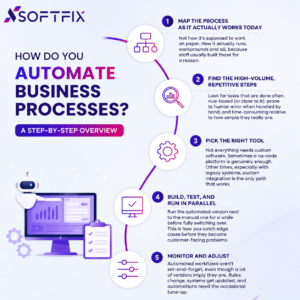
1. Map the Process As It Actually Works Today
Not how it’s supposed to work on paper. How it actually runs, workarounds and all, because staff usually built those for a reason.
2. Find the High-Volume, Repetitive Steps
Look for tasks that are done often, rule-based (or close to it), prone to human error when handled by hand, and time-consuming relative to how simple they really are.
3. Pick the Right Tool
Not everything needs custom software. Sometimes a no-code platform is genuinely enough. Other times, especially with legacy systems, custom integration is the only path that works.
4. Build, Test, and Run in Parallel
Run the automated version next to the manual one for a while before fully switching over. This is how you catch edge cases before they become customer-facing problems.
5. Monitor and Adjust
Automated workflows aren’t set-and-forget, even though a lot of vendors imply they are. Rules change, systems get updated, and automations need the occasional tune-up.
Workflow Automation Company Canada: Low-Code vs No-Code Platforms
Both let non-developers build workflows without writing code from scratch. They’re not the same thing, though.
No-code platforms target business users directly: drag-and-drop, pre-built templates, and barely any technical knowledge needed. Fine for simple workflows.
Low-code platforms allow some custom scripting alongside the visual tools. Better for complex logic or systems that need special handling a template just won’t cover.
Small businesses with simple, single-department workflows often do fine on no-code. Bigger or more complex operations, especially anything touching legacy software, usually need low-code or a fully custom build from a workflow automation company in Canada that’s dealt with messier setups before.
Common Business Automation Mistakes
A lot of automation projects underdeliver, and it’s rarely the software’s fault. The usual culprits:
- Automating a broken process instead of fixing it first, which just moves the mess faster
- Skipping change management, so staff quietly avoid the new system and keep doing things the old way
- Picking a tool before mapping the process, which means buying more (or less) than what’s actually needed
- No monitoring plan after launch, so small breakages go unnoticed until they cause a real problem
- Trying to automate everything at once instead of starting with one or two high-impact processes and building from there
Signs Your Business Needs Automation
A few signals worth paying attention to: staff spending hours a week on manual data entry between systems, the same information typed into multiple platforms, errors that keep showing up in repetitive tasks like invoices or scheduling, response times to customers or leads that are slower than they should be, and admin workload that’s growing faster than the team itself.
If a few of those sound familiar, a scoped automation assessment usually pays for itself pretty quickly.
Automation by Function: Where Businesses See the Fastest Wins
Automation in Finance and Accounting
Invoice processing, expense approvals, reconciliation between systems, and recurring reporting. These are some of the most commonly automated finance tasks, mostly because they’re high-volume, rule-heavy, and error-prone by hand.
Automation in HR and Onboarding
New hire paperwork, payroll data entry, benefits enrolment, onboarding checklists. Strong candidates, since they happen often enough to matter and mistakes here tend to be slow and expensive to fix.
Automation in Customer Service
Ticket routing, first-response chatbots, and status notifications. These free up support staff for conversations that actually need a human. This is also where automation and AI agents start overlapping, since more advanced systems can now close out simple tickets from start to finish.
Industrial Automation Company Canada: What’s Different in Manufacturing
Manufacturing tends to bring its own set of problems. An industrial automation company in Canada usually deals with production tracking, equipment monitoring, and supply chain coordination on top of the standard office-side automation work and often has to connect newer software to machinery and systems that have been running for a decade or more.
What Industries Benefit Most From Automation?
Finance and professional services, for document-heavy, compliance-sensitive work. Retail and e-commerce, for order processing and inventory syncing. Manufacturing, for production tracking and supply chain coordination. Healthcare and insurance, for claims processing and patient intake. Logistics, for shipment tracking and vendor communication.
It’s less about the industry label itself and more about the shape of the work: high volume, standardised processes, repeated often enough that automating them actually pays off.
How Do You Measure Success After Implementing Automation?
Automation ROI isn’t just “did we save money”? Worth tracking: time saved per process (in hours per week or month), error rate reduction, especially for data entry or compliance-sensitive tasks, processing speed from start to finish, freed-up staff capacity and what that time gets redirected toward, and cost per transaction before versus after.
If a vendor can’t help define these before the project even starts, it gets a lot harder to prove the automation actually worked once it’s live.
How Do I Choose the Best Automation Company in Canada?
Plenty of firms call themselves the top automation companies in Canada these days. A real filter separates the ones worth hiring from the ones just selling a single tool.
Questions Worth Asking Before You Sign
Have they mapped processes before, or do they jump straight to picking a tool? Do they handle legacy systems or only modern, API-friendly software? Can they explain when RPA fits versus when AI-driven automation is actually needed? What does change management look like in their process, or is that all left to you? Is post-launch monitoring included, or is it a separate cost that shows up later? Can they point to a similar business they’ve automated, with real numbers to back it up?
A Few Red Flags
A vendor recommending the exact same tool for every client, regardless of fit. No mention of process mapping before the build even starts. Pricing based purely on software licensing, with zero visibility into implementation or support costs. No plan for what happens once the underlying process changes after launch.
The Future of Automation in Canada
A few trends worth watching further into 2026: AI is increasingly built into automation platforms by default now, not sold as a separate bolt-on. The line between “automation” and “AI agents” keeps blurring, with more platforms handling fixed rules and judgement-based exceptions in the same system.
Small and mid-sized Canadian businesses are adopting automation faster than in past years, partly because low-code tools have lowered the technical barrier to entry. And legacy system integration is still the biggest bottleneck for a lot of Canadian companies, especially in manufacturing and finance, where older core systems are still doing the heavy lifting.
Why Work With Softfix Technologies for Business Automation in Canada
Softfix Technologies builds automation that actually gets used, not shelved after the demo.
With hands-on experience in custom software development, AI/ML integration, and enterprise systems, we handle both the straightforward RPA work and the more complex, AI-driven automation that legacy software often needs. As an enterprise automation company, Canada businesses turn to us for larger, cross-department builds; we scope every engagement around the actual workflow, not a generic package.
What that looks like in practice:
- Process mapping before any tool gets picked
- Automation matched to the real complexity of the workflow, not whatever platform happens to be trending
- Direct integration with the CRMs, ERPs, and legacy systems your team already relies on
- Change management support so the new workflow actually sticks
- Ongoing monitoring after launch, since automations need tuning as your business changes
Whether you’re a small business in the Greater Toronto Area automating your first workflow or an enterprise team in Ontario consolidating automation across departments, Softfix scopes the work around your actual processes.
Frequently Asked Questions
What is business process automation?
It’s the use of software to handle repetitive, rule-based tasks, data entry, invoice processing, and scheduling, so staff time goes toward higher-value work instead.
What does an automation company do?
Maps out inefficient manual processes first, then builds or configures the right software, RPA, workflow tools, or AI-driven automation, to handle those tasks with minimal human input.
How much does automation cost for a small business in Canada?
Somewhere between $3,000 for a single automated workflow and $60,000-plus for a multi-process RPA setup. AI-powered automation with real system integration usually lands between $40,000 and $150,000.
What is the difference between RPA and AI automation?
RPA sticks to fixed rules and handles structured repetitive tasks well but breaks when the process shifts. AI automation adds judgement on top, handling unstructured input and adjusting to exceptions within limits.
How do I choose the best automation company in Canada?
Find a vendor that maps your processes before pitching a tool. Real legacy-system experience matters. So does change management support and monitoring after launch, not just a build-and-disappear model.
What is the ROI of business automation?
Time saved per process, fewer errors, faster processing, freed-up staff capacity. Even one high-volume workflow can pay for itself in a matter of months.
What processes should a business automate first?
The high-volume, repetitive, rule-based ones that are prone to error by hand. Invoice processing and cross-system data entry are usually the easiest starting points.
How long does it take to implement automation in a business?
A single workflow can often go live in 2 to 6 weeks. Multi-process or enterprise-wide builds usually take 2 to 6 months, depending on how tangled the systems already are.
Is automation worth it for small businesses?
Generally yes, as long as the process happens often enough to justify it. A monthly task probably won’t move the needle. Something done dozens of times a week almost always will.
What is the difference between automation and AI agents?
Automation follows fixed rules for repetitive tasks. AI agents plan multi-step actions, apply judgement, and adapt to situations that don’t fit a script, and the two often work side by side rather than replacing each other.
What industries benefit most from automation?
Finance, retail, manufacturing, healthcare, and logistics, mainly because they combine high transaction volume with standardised, repeatable work.
How do you measure success after implementing automation?
Time saved, error reduction, processing speed, and cost per transaction, tracked before and after, give the clearest read on actual ROI.
Final Thoughts
Automation isn’t just for large enterprises with big budgets anymore. Plenty of small and mid-sized Canadian businesses are finding that one or two well-chosen automated workflows free up real staff time and cut down on costly errors.
The best automation company in Canada for your business is the one that starts by mapping your actual processes, not the one pushing a single tool regardless of fit.
If you’re comparing automation companies in Toronto, Vancouver, Montreal, or anywhere else in Canada, Softfix Technologies can walk you through a scoped process assessment built around your real workflows.
Talk to Softfix Technologies about automating your business →